Search Console Query Overlap Analysis: A Practical CSV Workflow
Use real query–page data to investigate overlapping pages, review intent and choose a measured content change without assuming cannibalization.
Start with a question you can answer
Two pages appearing for the same query can be useful: a calculator may solve the immediate problem while an article explains the method. Overlap becomes a review candidate when the pages seem interchangeable, a less suitable page gets the visibility, or visitors struggle to find the intended answer. Write down the concern before opening an export. For example: Are our bundle calculator and bundle guide serving different needs? That question leads to inspecting their content and performance. It does not require deciding in advance that one URL must disappear.
Obtain paired dimensions rather than joining unrelated totals
The overlap analyzer needs CSV columns query,page,clicks,impressions,position. Separate Queries.csv and Pages.csv exports do not establish which query belongs to which page. Use an export that actually contains both dimensions, or obtain paired rows through Search Console’s Search Analytics API with query and page dimensions. The API supports this grouping but does not guarantee every row. Keep a note of the property, date range, search type and filters used. Our analyzer reads your CSV offline; it does not connect to your property, request authorization or retrieve additional records.
Reproduce the supplied example
The example contains three rows: bundle calculator against https://example.com/tool with 30 clicks, 1,000 impressions and position 5; the same query against https://example.com/guide with 10 clicks, 500 impressions and position 8; and shipping guide against a third page with 20 clicks, 400 impressions and position 4. With the minimum impressions filter at zero, the tool reports two distinct queries and one query with overlap. The tool page has a 3% CTR and 66.67% of the 1,500 supplied bundle-query impressions; the guide has a 2% CTR and 33.33%.
Read the denominator before interpreting a share
Those page shares describe the rows supplied to the analyzer. They are not shares of unique people or a reconstruction of the property’s total impressions. Search Console uses different aggregation when grouping by property and by page. Repeated query–page pairs in this tool are summed, with position weighted by impressions. If you accidentally paste the same export twice, you double its counts. Combine non-overlapping periods with matching filters when that is intentional, and keep a single-period view when examining a recent change. A missing row is missing evidence rather than proof that a page never appeared.
| Page | Clicks | Impressions | Share of supplied query impressions |
|---|---|---|---|
| /tool | 30 | 1,000 | 66.67% |
| /guide | 10 | 500 | 33.33% |
Fictional paired rows. Impression share is not unique-search share; overlap alone does not prove cannibalization.
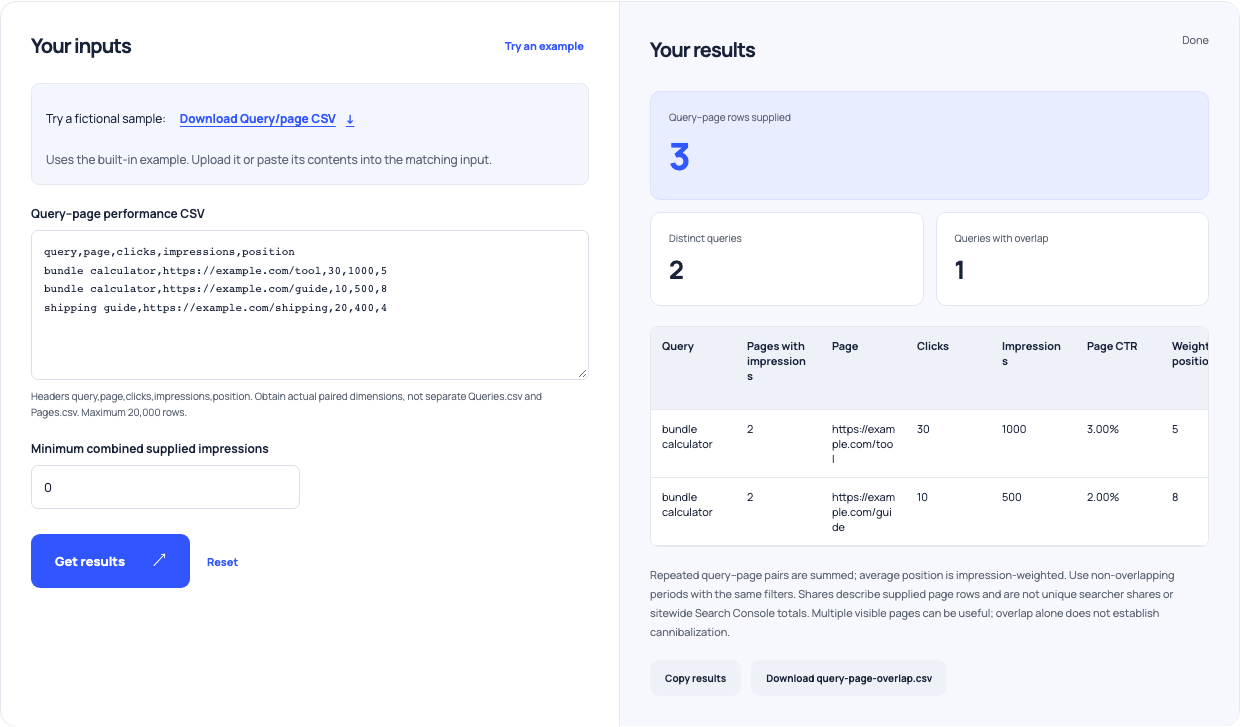
Use this example Opens Search Console query overlap analyzer with these inputs.
Compare the actual page purpose with the query
Open both pages and identify the first useful action each offers. A working calculator should make its inputs and result easy to find. A method article should answer the explanatory question and point to the calculation when appropriate. Check current search results for the query in the audience and market you serve, while recognizing that results vary. The keyword organization tool can help keep learning, comparison and utility phrases in a review table, but its English modifier rules are only labels. They do not discover intent, keyword demand or semantic topic clusters.
Use metadata and low-CTR reports as supporting evidence
The bulk metadata audit can identify identical titles, empty descriptions or text outside the review ranges you choose. Its example audits three pages, flags all three and finds two missing fields. That is a useful editing queue, not a list of Google violations. The Search Console quick-win analyzer supplies a different view: its default four-row example yields three matching rows with a combined CTR of 2.08%. Start with substantial impressions, then inspect the page and context. A low CTR alone does not tell you whether the issue is the title, the result layout, the audience or an unsuitable page.
Choose one concrete change and preserve the baseline
If the pages serve distinct needs, clarify their titles, headings and links so the distinction is visible. For our example, the calculator can emphasize calculating a bundle price while the guide explains how to choose one. If content is substantially redundant, evaluate whether combining it would produce a better destination before planning a redirect. Record the old URLs, their purpose and the measured period. Avoid deleting a useful tool because a report has two rows. Redirects, canonicals and content consolidation require their own implementation checks; this CSV report does not decide which is appropriate.
Review the result without treating a movement as proof
Save the change date and return to comparable query–page data after enough observations accumulate. Compare which pages received impressions and clicks, whether the intended page is answering the need, and whether total useful visits changed. Note other changes to the site, seasonality and differences in filters. A later improvement is an observation, not a controlled attribution to one title edit. Keep the tool and guide if they continue to do distinct jobs. The productive outcome is a documented decision about specific pages, followed by a repeatable check, rather than an automatically generated cannibalization verdict.