Audit Image Alt Text: Missing, Empty and Unhelpful Alternatives
Use an HTML attribute audit to create a human review queue rather than an accessibility score.
Choose the HTML you mean to inspect
Paste or upload the page’s HTML source. If scripts create images, export the relevant rendered HTML separately; the audit does not execute those scripts. It reads img attributes without loading the images. CSS background images, SVG accessibility and the actual visual content are not included. Note which source version you supplied so the review queue can be traced back to a real page.
Reproduce the three-image example
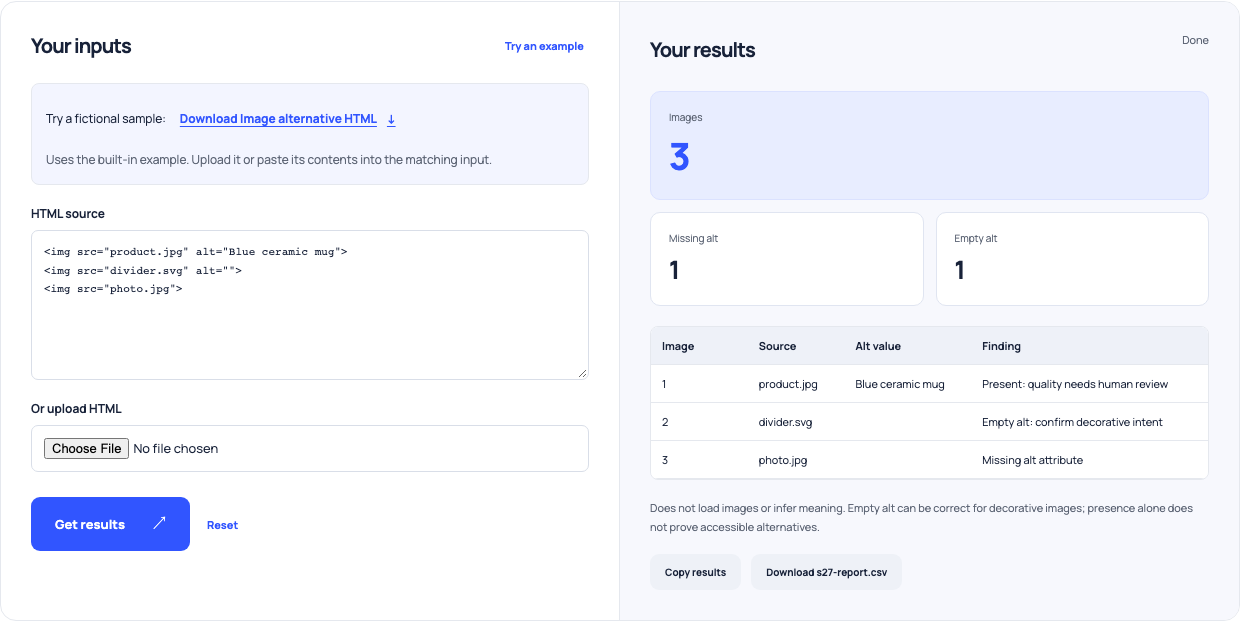
The sample contains product.jpg with alt Blue ceramic mug, divider.svg with an empty alt attribute, and photo.jpg without alt. The report identifies three images, one missing attribute and one empty alternative. The mug’s alternative is present, but that alone does not prove it conveys the right detail. The divider’s empty value asks you to confirm decorative intent rather than automatically treating it as an error.
Read the image’s role on the page
An informative image needs an alternative appropriate to the surrounding content. A decorative image may correctly use alt="" so assistive technology can skip it. A linked image often needs text describing the link’s purpose, not merely its appearance. Inspect the nearby heading, caption, link and repeated content before writing a replacement. The same image can need different treatment in different contexts.
| HTML case | Local finding | Human question |
|---|---|---|
| alt="Blue ceramic mug" | Present | Does this convey the needed information? |
| alt="" | Empty | Is this image decorative or redundant? |
| No alt attribute | Missing | What role does the image serve? |
| alt="photo.jpg" | Suspicious filename | What should a visitor understand instead? |
The audit does not load images or assess their visual meaning.
Use this example Opens Image alt-text coverage audit with these inputs.
Treat suspicious wording as a review prompt
The tool can flag simple generic words or filename-like alternatives and contradictions with decorative signals. It cannot decide whether an alternative is sufficient, redundant or misleading without understanding the page. Avoid turning the report into a mechanical demand for longer descriptions. A concise meaningful alternative can be better than a detailed description that repeats nearby text or hides the purpose of a linked image.
Verify the revised page
Edit the actual markup, inspect the image in context and test the relevant reading experience. Re-run the attribute audit on the revised source to confirm that your changes are present. Keep unresolved cases in the review queue rather than claiming the whole page is accessible because every img now has an attribute. Presence is a useful coverage signal, not a complete accessibility assessment.