Generate and Check LocalBusiness JSON-LD
Build truthful local-business markup, lint selected fields and validate it on the actual page.
Collect visible business details
Start with the name, address, page URL, phone and opening hours shown to customers. Do not invent coordinates, ratings or review totals to make a template look complete. The LocalBusiness generator creates a minimal general type with PostalAddress. A more specific business type may suit your real organization better; choosing one and adding its relevant properties requires a separate content and vocabulary review.
Reproduce the generated object
The fictional Example Studio uses https://example.com/, 123 Example Street, Example City, region CA, postal code 90001 and country US. Its opening-hours example is Mo-Fr 09:00-17:00. The generator produces name, URL, an identifier and PostalAddress, with optional phone and basic hours. It escapes less-than signs in JSON for safer script embedding. The demonstration address is not evidence of a real business and must be replaced before use.
Use the linter for its actual scope
Paste the generated JSON into the structured-data linter. It accepts an object, array or @graph and checks syntax plus selected context, type and URL shapes. For a LocalBusiness node it also checks minimal name and address presence. Try an object with only @type: LocalBusiness to see missing context, name and address findings. The linter does not fetch contexts, expand JSON-LD or validate the complete Schema.org vocabulary.
| Check | Evidence | Does not prove |
|---|---|---|
| JSON syntax | Text parses as JSON | Correct vocabulary or truthful content |
| Local structural linter | Selected fields and shapes | Complete JSON-LD semantics |
| Platform feature test | Relevant feature requirements | Guaranteed display in search |
| Business/page review | Actual visible details | Automatic verification by this tool |
No ratings, reviews or business facts are invented.
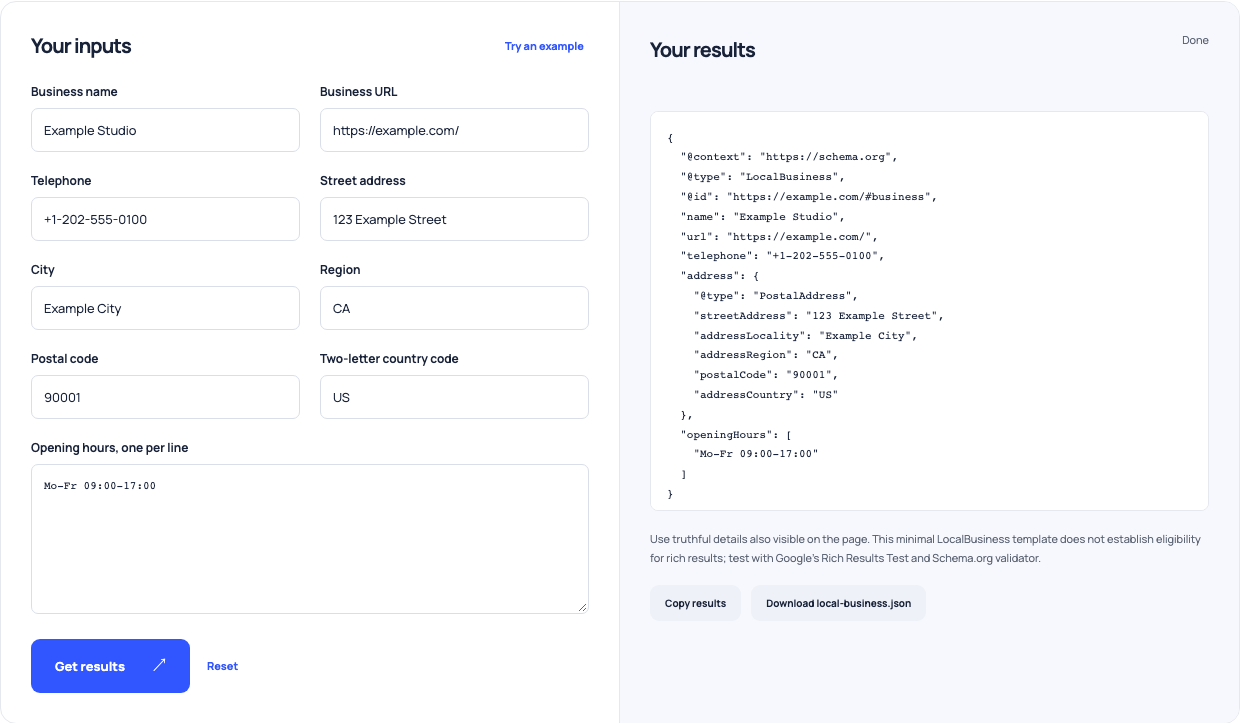
Use this example Opens Local business structured-data with these inputs.
Check meaning and eligibility separately
Relative identifiers can be valid in context, so a review finding is not an automatic semantic failure. Conversely, valid JSON can describe an inaccurate or unsupported claim. Embed the reviewed object in the actual business page, use dedicated Schema.org and Google validation tools, and examine the requirements for your intended feature. Those checks still do not promise that Google will display an enhancement.
Keep the markup synchronized
When the address, phone or hours change, update the visible page and structured data together. Confirm the rendered application/ld+json block rather than assuming a CMS saved what you pasted. Record the tested page URL and date. These local helpers prepare and inspect a draft; they do not update a Business Profile or independently verify the business identity.