How to Validate and Split an XML Sitemap: Limits and Examples
Check XML syntax, URLs and dates, understand sitemap count and byte limits, then download complete sitemap parts and an index.
Start with the list you intend to publish
A sitemap is most useful when it reflects a deliberate set of public destinations. Start with your current tool, article and category pages, then check whether each URL is the preferred version you want visitors to find. Look for old hostnames, staging addresses, query variations and removed pages. A file can be perfectly formed XML while listing the wrong destinations. The Small Hours validator helps inspect the file’s syntax and selected protocol rules. It never visits those URLs, so you still need to check their responses, page purpose, canonical settings and indexing instructions separately.
Understand both limits before splitting
Google’s guidance limits a sitemap to 50,000 URLs or 50 MB uncompressed. The sitemap protocol expresses the byte cap as 52,428,800 bytes. Compression does not make an oversized uncompressed document fit that limit. Our splitter checks both the chosen entry count and serialized UTF-8 bytes, including the XML declaration and root wrapper. You can choose smaller count-based parts for organization, but one part must still fit the byte limit. An entry containing extensive extension data can consume more space than a plain page URL, so URL count alone is insufficient.
Reproduce the three-URL example
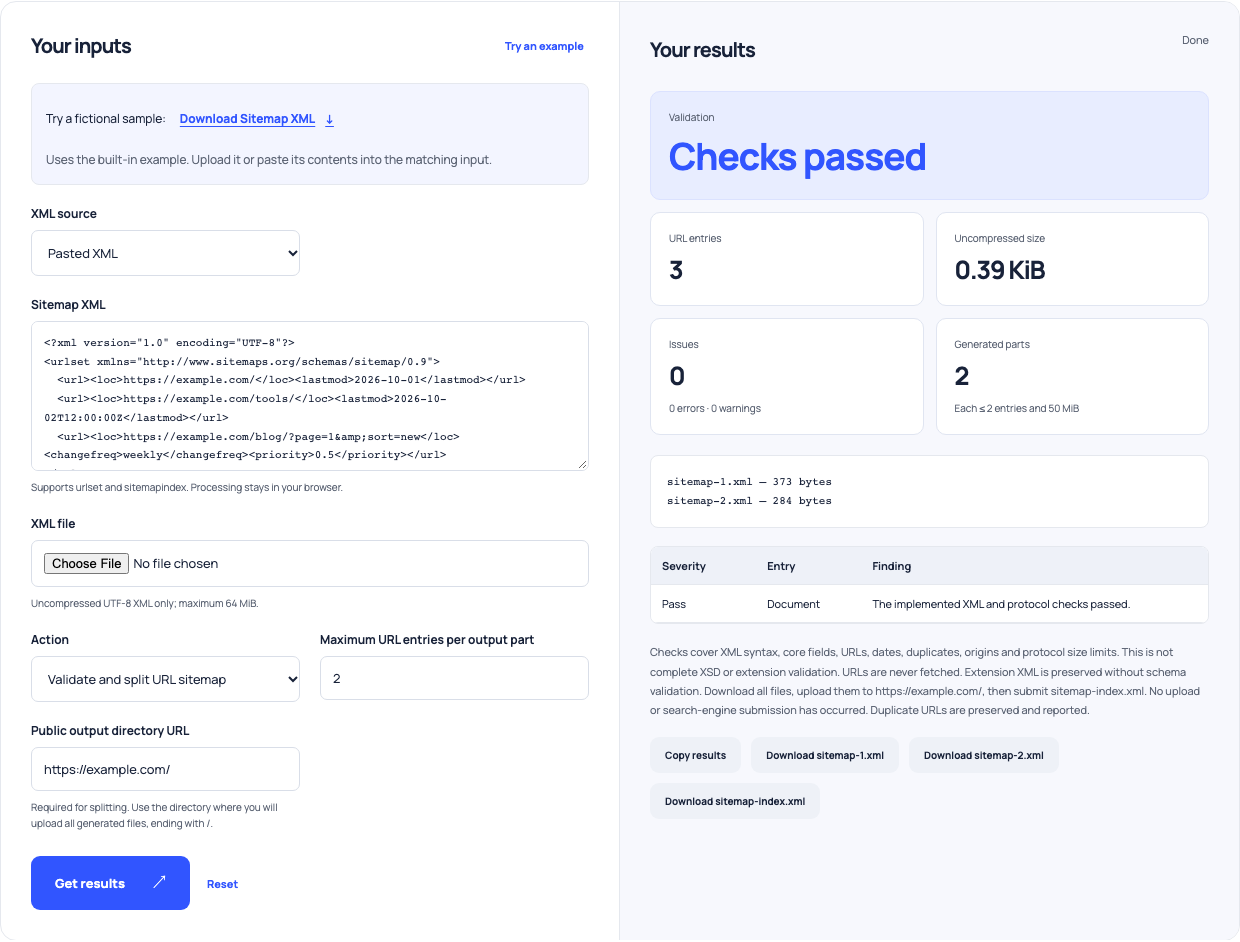
Select Try an example in the sitemap tool. The fixture contains https://example.com/, https://example.com/tools/ and https://example.com/blog/?page=1&sort=new, with the ampersand escaped as & in its XML source. It uses the standard sitemap namespace, a calendar lastmod on the first entry and a timestamp with timezone on the second. The action is Validate and split, with a maximum of two entries per part and https://example.com/ as the public output directory. The existing browser-checked fixture produces two sitemap part files and sitemap-index.xml. This is a small demonstration of splitting, not a file large enough to require it.
| Output | Contents | Purpose |
|---|---|---|
| First part | 2 URL entries | First slice of the original list |
| Second part | 1 URL entry | Remaining URL |
| Sitemap index | 2 part locations | Points to both published parts |
The two-entry part limit is for illustration. Production splitting also respects the uncompressed byte limit.
Use this example Opens Sitemap validator with these inputs.
Correct errors before treating warnings as acceptable
Read each finding alongside its entry number. A malformed XML document cannot be parsed. A relative location, invalid calendar date or unexpected core field needs correction before this splitter creates parts. Duplicate URLs are warnings and remain in output; the tool does not silently deduplicate the source. Multiple origins are outside its supported splitting scope and flagged as errors, even though Google documents verified cross-site submission arrangements separately. The distinction matters: a tool’s supported workflow can be narrower than every protocol deployment. Do not describe an unsupported arrangement as universally invalid.
Keep lastmod tied to a real content change
A valid date string establishes only its syntax. It does not establish that a page changed on that date. Google says lastmod should reflect a significant update and be consistently accurate. Keep that value connected to your publishing records rather than resetting every page whenever the sitemap is regenerated. The validator accepts complete calendar dates and timestamps with timezone; it does not accept every reduced-precision date form. Google ignores priority and changefreq values, so polishing those fields should not displace fixing missing pages, broken destinations or inaccurate modification information in the underlying publishing workflow.
Download all the parts and use the actual output location
The public output directory must match where you will upload the generated files and end in a slash. For the example directory, the index points to https://example.com/sitemap-1.xml and https://example.com/sitemap-2.xml. Uploading only the index leaves its referenced files unavailable. Use your site root when the listed pages span different path families; the splitter checks that URLs fit the chosen directory. Download each generated file, verify its name and save the original source beside it. Generation happens in the browser. No file has been uploaded or submitted to a search engine by this tool.
Recognize what local validation leaves unanswered
This tool accepts uncompressed UTF-8 XML up to 64 MiB and 100,000 entries. Larger inputs need a streaming workflow. It does not decompress gzip, fetch child files from a sitemap index, crawl destinations or perform complete XSD and extension-schema validation. Extension XML is preserved when splitting, but preserving it does not certify its meaning. For images, videos or alternate-language annotations, check the relevant requirements in their primary documentation. If validating an existing index, separately inspect the child sitemaps it lists. A clean index alone cannot establish that those remote documents are accessible or correctly formed.
Check discovery after publishing rather than promising indexing
Once the files are live, confirm their responses and referenced locations, then submit the sitemap or index through Search Console or reference it in robots.txt. Google treats submission as a hint, without guaranteeing download, crawling or indexing. Use the robots rules tester to review whether your pasted crawl rules permit important listed paths, and check the deployed behavior separately. Keep normal navigation links to useful pages as well. When a page is absent from results, investigate access, canonicalization, content and Search Console evidence rather than repeatedly resubmitting an unchanged sitemap. The file is one part of a working discovery path.