Days Between Dates and Date Offsets: Inclusive vs Elapsed
Count calendar days and add signed offsets without confusing month lengths or working-day rules.
Write the counting convention
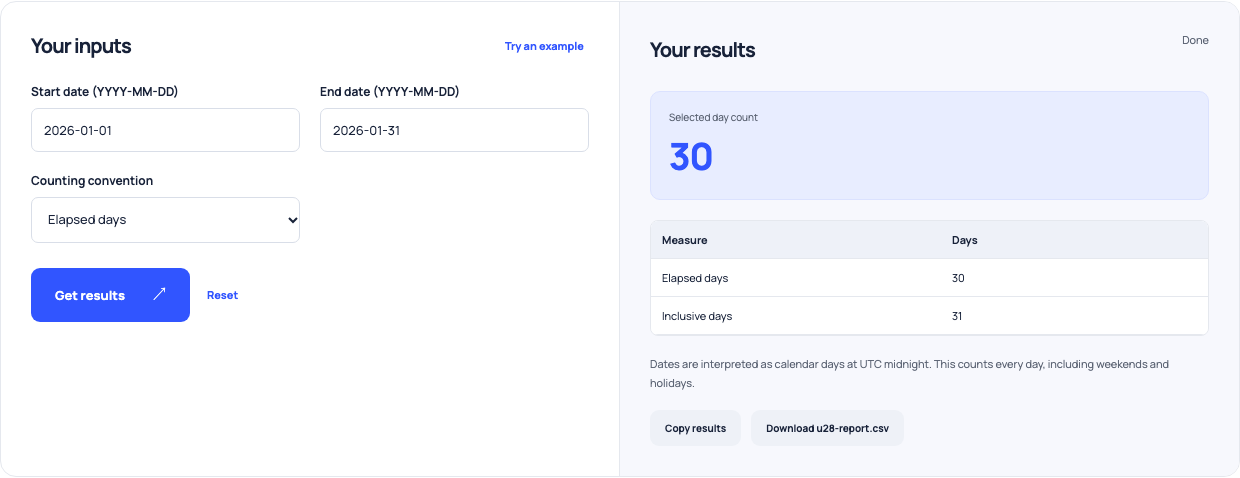
Elapsed days measure the boundaries crossed between dates. Inclusive counting includes both endpoints. Choose the convention used by your task before entering dates, especially when a form or agreement uses ambiguous wording such as within thirty days. These tools count all calendar days. They do not interpret legal deadlines or apply holiday and working-day calendars, so those rules need a separate check.
Reproduce the January interval
Enter start 2026-01-01 and end 2026-01-31. Elapsed days are 30; Include both endpoints gives 31. With equal dates, those answers would be zero and one respectively. The calculator validates real calendar dates and requires the end not to precede the start. Inputs use four-digit YYYY-MM-DD, keeping the intended date separate from ambiguous local day/month notation.
Add a signed whole-day offset
The date-offset example starts at 2026-01-31 and adds 30 days, producing 2026-03-02. A negative value subtracts days: 2026-01-01 with −1 gives 2025-12-31. The offset is whole calendar days, not a recurring monthly billing rule. Adding a month and adding thirty days are different operations because months have different lengths. Record the actual offset beside the resulting date.
| Question | Convention | Answer |
|---|---|---|
| Jan 1 to Jan 31, 2026 | Elapsed boundaries | 30 days |
| Jan 1 to Jan 31, 2026 | Include both endpoints | 31 days |
| Jan 31, 2026 plus 30 days | Signed calendar-day offset | Mar 2, 2026 |
| Feb 28 to Mar 1, 2024 | Leap year, elapsed/inclusive | 2 / 3 days |
Not working-day calculations or legal-deadline interpretation.
Use this example Opens Days between dates with these inputs.
Keep leap days and clock hours separate
From 2024-02-28 to 2024-03-01 there are two elapsed days and three inclusive dates. The arithmetic uses UTC day indices so local daylight-saving hour changes do not alter calendar-day counts. It does not calculate a timed interval between local appointments. If hours, timezones or an all-day calendar file matter, use the appropriate event workflow and specify those conventions separately.
Verify the rule before scheduling
Compare the calculated date with the task’s actual weekend, holiday and cutoff requirements. A local arithmetic answer cannot establish a contractual or jurisdiction-specific deadline. Keep the input dates and convention in the schedule note, then verify any manually adjusted date. The calculators make date arithmetic reproducible; they do not choose the applicable rule or notify anyone when the date arrives.