Build Mailto Drafts and Neutral Google Review Requests
Create correctly encoded email links and reusable, neutral review-request assets.
Choose which action the visitor needs
An email draft and a public review request are different actions. Use the mailto builder when a visitor needs to write directly to an inbox. Use the Google review-link helper when you already have the review-request URL from your Business Profile. Keep the visible text clear about the destination. Neither tool sends a message, looks up your business or establishes that a recipient can receive mail.
Encode an email draft deliberately
The mailto example uses hello@example.com, subject A quick question and a two-line body. Spaces in the subject become %20; body line endings become encoded CRLF. Entering Tea & coffee produces Tea%20%26%20coffee, so the ampersand remains message text rather than a query separator. Keep the subject on one line. The generated anchor escapes its visible label and URI for insertion into HTML.
Keep recipients out of a public secret
The builder supports comma-separated recipient, CC and BCC fields, but BCC values are visible to anyone reading the generated link source. Do not use a public mailto URL to conceal a private distribution list. A draft body may also expose information in copied markup or browsing history. Provide a visible contact address as a fallback for visitors without an installed mail handler.
| Asset | Produces | Does not establish |
|---|---|---|
| Mailto URI | A draft request for an email handler | Mailbox existence or delivery |
| Mailto HTML anchor | Escaped link markup | That every visitor has a mail app |
| Google review message | Neutral text using your supplied link | Correct business destination |
| Google review anchor | Copyable website link | Review authenticity or policy compliance |
Public link source can expose recipients and draft content.
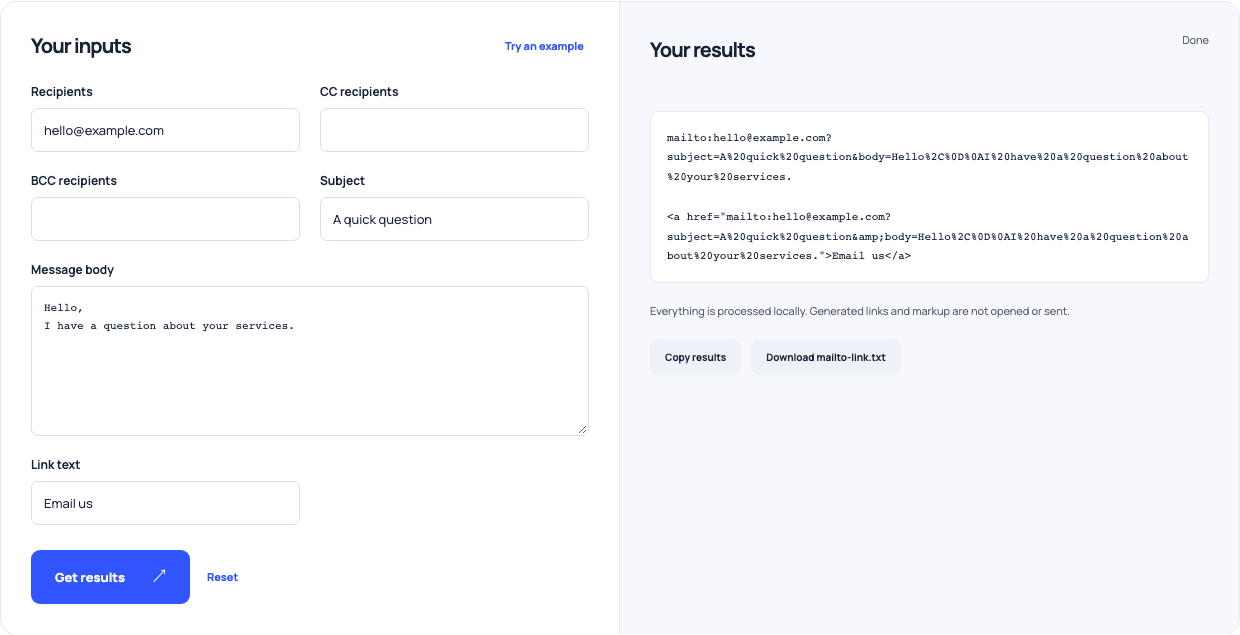
Use this example Opens Mailto link builder with these inputs.
Reuse the actual review-request link
The review helper’s fictional example uses a demonstration place ID and Example Studio. Replace that entire URL with the real link supplied by your Business Profile. The tool produces a neutral message and an escaped HTML link; a supported Google hostname is only a shape check. Test the destination yourself. Ask for honest feedback without incentives and without routing only happy customers to the review page.
Test the installed assets
Place the reviewed anchor on the intended page and try it with a configured mail app. Inspect recipients, subject and line breaks in the draft before closing it without sending. Test the real review URL separately and confirm the business identity. Keep the two workflows distinct so a correction request does not accidentally send someone to a public review form.