How to investigate a DMARC aggregate XML report
Read source counts and aligned results, compare them with a sender inventory, and avoid confusing DMARC failure with a confirmed attack.
Define the question and the reporting window
Start with a specific question: is a known newsletter sender failing alignment, or has an unfamiliar source appeared in the selected reports? Write down the reporting organization, policy domain and date range before combining files. An aggregate report summarizes a receiver’s observations; it is not a complete ledger of every message your organization sent. Missing receivers and reporting gaps matter. Keep the original report beside your notes so a later reviewer can inspect the same evidence. A high count without a defined reporting window is difficult to compare with a change in your sending activity.
Open the XML the reader actually supports
The DMARC aggregate report reader accepts a complete XML document or selected UTF-8 XML files. Extract compressed archives first: ZIP and GZIP contents are not parsed directly. The current interface supports up to twenty files, five megabytes total and twenty thousand records. File input replaces pasted XML. Review which files are selected before running the analysis. Processing stays in your browser, but that does not establish the report’s authenticity. Use reports received through your normal reporting workflow and retain their provenance rather than treating an arbitrary downloaded XML file as authoritative.
Distinguish alignment from a raw authentication pass
DMARC relates successful SPF or DKIM authentication to the visible From domain through alignment. A raw pass for another domain can coexist with an alignment failure. The reader counts policy_evaluated results, rather than substituting raw auth_results values. That choice matters when investigating forwarding or services that sign with a different domain. Compare the relevant identifiers before interpreting an apparent contradiction. RFC 9989 describes the authentication and alignment model; RFC 9990 defines aggregate reporting. Neither a raw pass nor a published policy is enough, by itself, to explain the outcome of every message.
Work through the fictional demonstration report
The built-in example contains three records: 120 messages with aligned SPF and DKIM passes, 30 with aligned DKIM passing and aligned SPF failing, and 10 with both failing. Adding the supplied counts gives 160 messages. The first two groups contribute 150 DMARC passes because either aligned mechanism is sufficient; ten fail. The failure share for this fixture is 10 divided by 160, or 6.25%. These are calculations from deliberately fictional XML, not observations about a real domain or provider. Use the example to learn which fields drive the totals before importing your own reports.
| Aligned DKIM | Aligned SPF | Messages | DMARC summary |
|---|---|---|---|
| Pass | Pass | 120 | Pass |
| Pass | Fail | 30 | Pass |
| Fail | Fail | 10 | Fail |
| Total | Either aligned mechanism passes | 160 | 150 pass; 93.75% |
Fictional report. Receiver disposition and alignment outcome are separate fields.
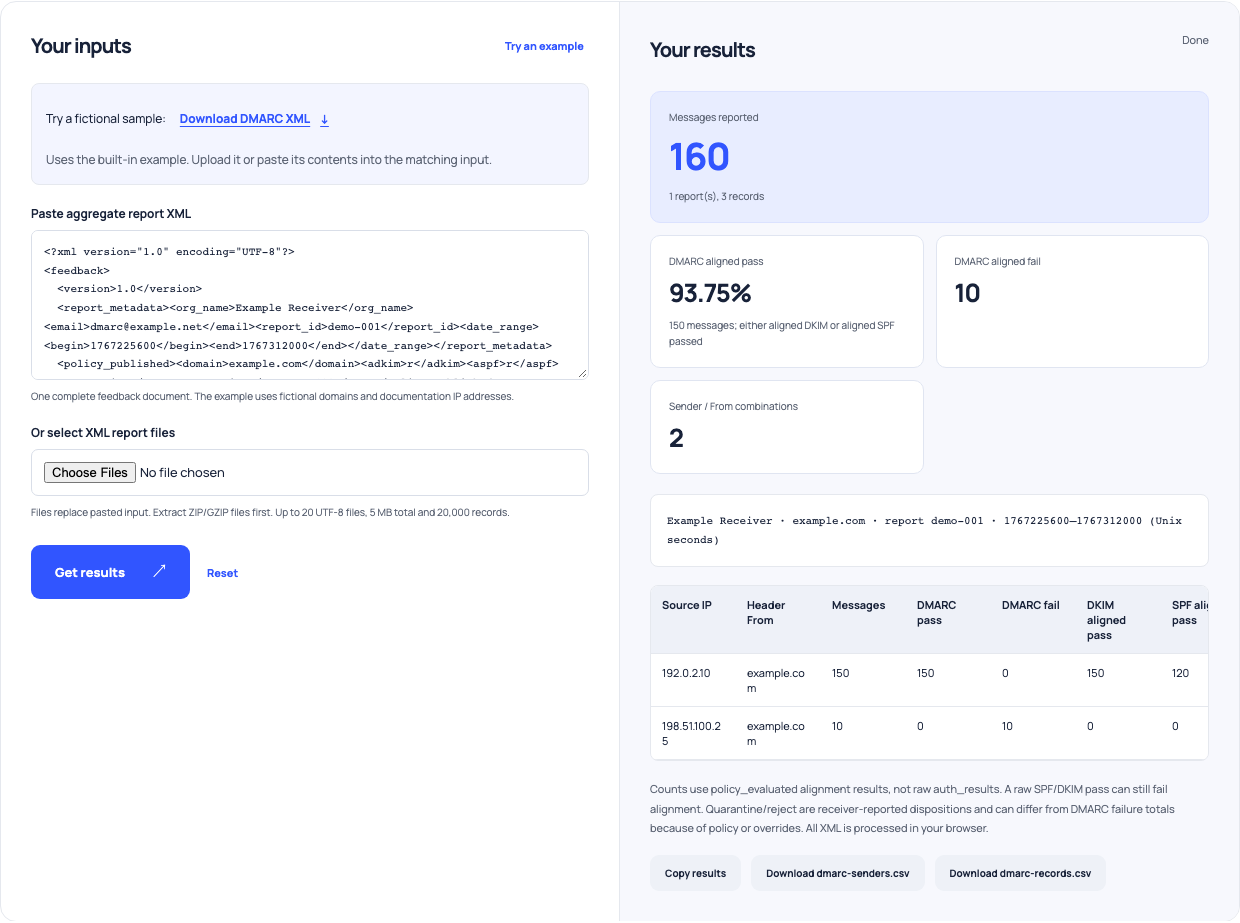
Use this example Opens DMARC report reader with these inputs.
Keep disposition separate from authentication
A report also supplies the receiver’s disposition. The reader accepts pass from RFC 9990, legacy none, quarantine and reject; it is a structural reader rather than full XML schema validation. Do not assume the quarantine count must equal all DMARC failures. Policy choices and receiver handling can make those totals differ. In the fictional example, the ten failing messages have a quarantine disposition; that relationship belongs to the supplied fixture and is not a universal rule. Read the record-level information before escalating an unexplained difference. The alignment fields drive authentication totals, independently of the action the receiver reports.
Compare a source with your sending inventory
For an unfamiliar source, compare the source address, visible domain and observation period with your known services and recent changes. A new invoice platform or migrated newsletter integration may explain traffic that was absent from the old inventory. Forwarding or unauthorized use are other possibilities. The reader does not attribute an IP address to a provider or classify a source as malicious. Keep those judgments separate until you have evidence. Record a practical next step, such as checking the provider’s configured signing domain, rather than automatically removing or blocking every row that fails alignment.
Avoid counting the same observations twice
Keep report identities and reporting periods in your working record. The reader rejects duplicate identities within one submission, but different report IDs with overlapping periods can still describe overlapping traffic. Combining those files can inflate an apparent trend. Compare like-for-like receiver coverage and intervals when measuring improvement after a configuration change. Also remember that the displayed table can be limited while the download retains more rows. Investigate the full export when necessary. A changing percentage can reflect a changed selection of reports as well as a changed sending configuration.
Verify a real message before changing policy
Use the DMARC record checker to inspect the currently published policy, then obtain a representative message from the affected legitimate service. Read trusted recipient-added headers with the header analyzer and compare identities with the report. Current DNS may differ from the policy observed during an earlier report interval. Keep that timing difference explicit. Once the cause is understood, review the relevant service configuration and your policy-change process. A report is a diagnostic lead, not a promise of delivery or a command to move immediately to a stricter policy. Retain the evidence and verify subsequent observations.