Print Size, PPI and Fractional Inches to Millimetres
Calculate print dimensions and convert fractional lengths while separating rounding from original measurements.
Identify the kind of measurement
Pixel dimensions describe a raster file. Inches or millimetres describe physical length. PPI connects those quantities through a chosen print-sampling assumption, while printer DPI describes dots produced by a device. Write the unit and convention beside the number before calculating. If a print service needs bleed, safe areas or minimum sampling, record those requirements separately instead of expecting a dimension calculator to infer them.
Reproduce the print example
An image 2400 pixels wide and 1600 pixels high at 300 pixels per inch produces 8 by 5.333333 inches. Multiplying by 2.54 gives 20.32 by about 13.546667 centimetres. At 150 PPI, the same pixels occupy 16 by 10.666667 inches. The lower PPI spreads the original pixels over a larger area; it does not add detail or establish that the larger print will look sharp.
Convert a fractional physical length
In the fractional-length tool, enter 5 whole feet and 2 3/8 inches. Five feet is 60 inches, so the total is 62.375 inches. Using exactly 25.4 mm per inch gives 1584.325 mm. The optional nearest 1/16-inch display rounds only its displayed fraction; metric output uses the original entered length. Choose the denominator that matches your ruler and inspect the reported rounding error.
| Scenario | Calculation | Result |
|---|---|---|
| 2400-pixel width at 300 PPI | 2400 ÷ 300 | 8 inches |
| 2400-pixel width at 150 PPI | 2400 ÷ 150 | 16 inches |
| 5 ft + 2 3/8 in | 60 + 2.375 | 62.375 inches |
| Metric physical length | 62.375 × 25.4 | 1584.325 mm |
Print sampling and physical cut measurements are different jobs; preserve their original inputs.
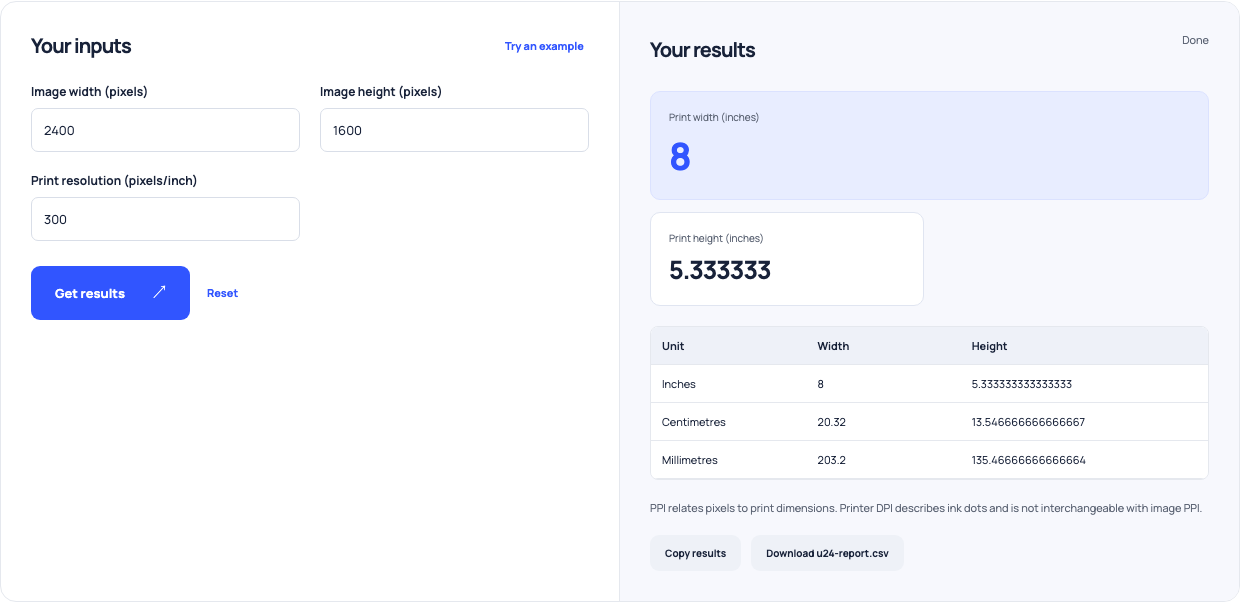
Use this example Opens Pixels to inches print with these inputs.
Keep display rounding out of the original
A fraction that looks cleaner can differ from the original measurement. Do not round to a ruler increment before converting unless that is a deliberate change in your working specification. This calculator handles nonnegative lengths; it does not recommend cutting tolerance, tool compensation or assembly clearance. For print work, similarly keep the pixel source and PPI assumption rather than treating a rounded inch display as a measured physical proof.
Verify against the actual process
Check a print proof or measured part using the process’s own requirements. A calculation can expose a unit mistake, but it cannot measure printer sharpness, image quality or a saw’s kerf. Retain source dimensions and exact conversion settings with the job notes. The related aspect-ratio calculator can help plan file dimensions, while the image resizer is needed when the file itself must change.