GB vs GiB and Mbps vs MB/s: Estimate File Transfer Time
Convert storage units and estimate transfers using explicit bit, byte and throughput conventions.
Keep the prefix and symbol together
A displayed number without its unit is not enough to estimate a transfer. GB means 1,000,000,000 bytes in the storage converter; GiB means 1,073,741,824 bytes. A byte contains eight bits. Connection speeds often use bits per second, while file sizes use bytes. Note whether the speed is Mbps, MB/s or MiB/s before comparing it with the file size.
Reproduce the unit conversion
Select 1 GB in the storage converter. It produces one billion bytes and about 0.931323 GiB. Selecting 1 GiB instead gives 1.073741824 GB. This is unit arithmetic, not a report about usable disk capacity. File-system overhead, reserved space and compression are different effects. Do not use the converted number as evidence that storage has disappeared from a device.
Reproduce the transfer estimate
The transfer calculator example uses file size 1 GB and connection speed 20 Mbps. Convert 20 million bits per second to 2.5 million bytes per second, then divide one billion bytes by that rate: 400 seconds. At an assumed 85% usable throughput, divide by 0.85 to obtain about 470.59 seconds, or 7.84 minutes. That percentage is your assumption, not a connection measurement performed by the tool.
| File and speed | Throughput | Seconds |
|---|---|---|
| 1 GB at 20 Mbps | 100% | 400 |
| 1 GB at 20 Mbps | 85% | 470.5882 |
| 1 GB at 20 MB/s | 100% | 50 |
| 1 GiB at 20 Mbps | 100% | 429.4967 |
Excludes startup latency and retries beyond the chosen throughput assumption.
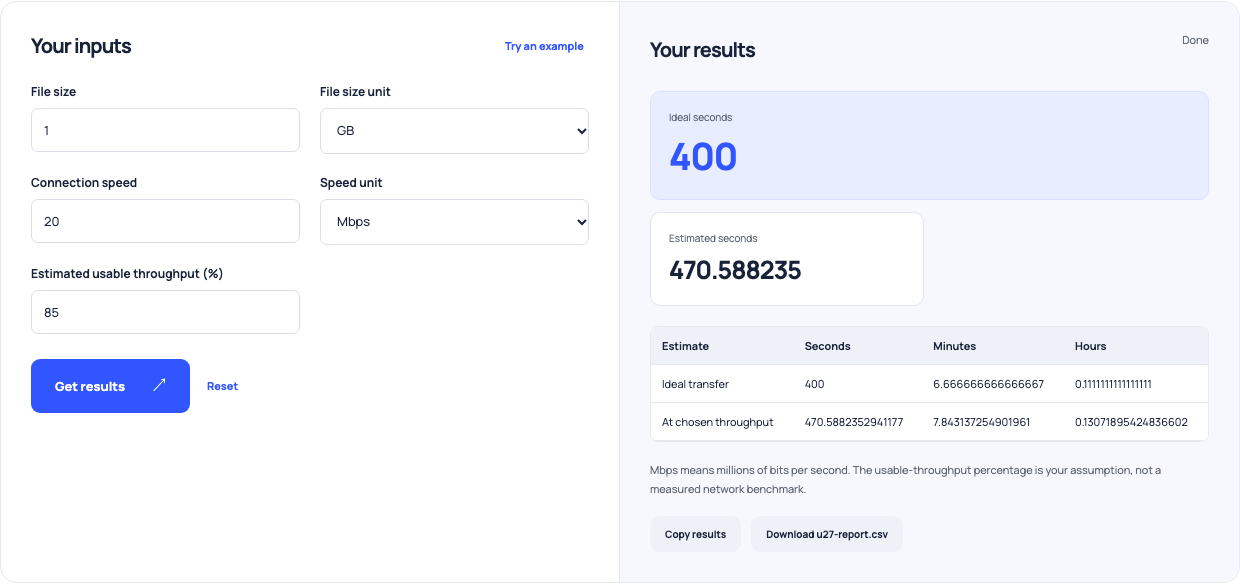
Use this example Opens Download and upload time with these inputs.
Compare like-for-like rates
At 20 MB/s rather than 20 Mbps, the same decimal 1 GB file takes 50 ideal seconds. At 100% throughput, a 1 GiB file at 20 Mbps takes about 429.50 seconds. These differences come from the unit choice, not an observed improvement in the network. Keep one source-size convention and one speed convention for each comparison, then vary the throughput assumption deliberately.
Leave room for real transfer behavior
Startup latency, interruptions, retries and changing speed are not explicitly modeled. Measure a representative transfer if timing matters and update the assumption based on that evidence. The tool does not upload a file or benchmark your connection. Use its estimate to plan a window and explain unit differences, then verify whether the real system can sustain the required rate.