CSV to JSON and Strict JSON Validation: Preserve Leading Zeroes
Convert quoted CSV deliberately and check JSON syntax without silent type inference.
Choose a schema before converting
Start with a CSV header that names each column once and a clear delimiter. The converter rejects duplicate or empty headers and inconsistent record widths rather than silently guessing. Valid quoted commas and line breaks remain part of a cell. Decide whether the destination needs objects keyed by headers or arrays including a header row. Keep the original export so you can check meaningful values afterward.
Reproduce the two-product example
The sample CSV has Code and Name columns, with 00123,Notebook and 00456,Pen. Objects output produces two JSON objects whose Code values are quoted strings. No number, date or boolean inference is performed. Arrays output instead retains the header array and each data array. Uploaded UTF-8 input takes priority over pasted text, so clear a selected file before expecting a different pasted sample to be used.
Validate JSON without adding meaning
Paste the generated result into the JSON formatter and choose two-space, four-space or compact output. Comments, trailing commas and malformed JSON fail. The formatter rejects unsafe integers, numeric overflow and excessive nesting or value counts. It does not check a destination schema, required business fields or the truth of a product name. Duplicate object keys in supplied JSON retain their last parsed value, so inspect the original when duplication matters.
| Input or choice | Result | Implication |
|---|---|---|
| CSV Code 00123 | JSON string "00123" | Leading zeroes retained |
| CSV numeric-looking price | JSON string | Receiving application chooses the type |
| Duplicate CSV headers | Rejected | Prevents ambiguous object keys |
| Huge unquoted JSON integer | Rejected by formatter | Quote identifier values |
| Valid JSON syntax | Parses and formats | Does not validate an API schema |
Duplicate JSON keys retain the last parsed value; inspect source when this matters.
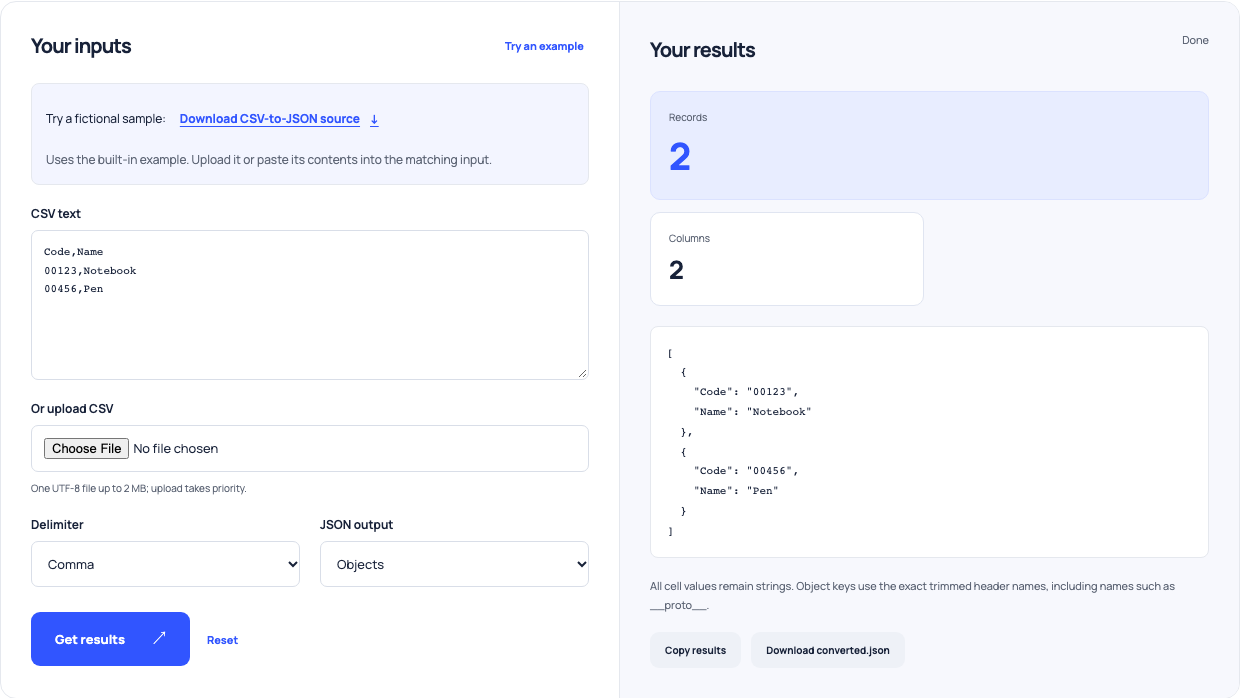
Use this example Opens CSV to JSON with these inputs.
Keep large numbers and formulas in context
A long identifier should remain a quoted JSON string even if it contains only digits. An unquoted integer outside JavaScript’s safe range is rejected by this formatter. Formula-like CSV values remain ordinary JSON strings during conversion; a later spreadsheet import can interpret them differently. Do not assume a successful JSON conversion makes every downstream rendering or import context safe. Choose types deliberately in the receiving application.
Test the receiving payload
Download a small result, compare record count and important identifiers with the original, and try it in the actual integration. Check empty strings, multiline notes and optional fields as well as the first record. The converter is bounded to 2 MB, 10,000 data rows and 200 columns. Successful parsing establishes a structure; it cannot establish that a service accepts the chosen keys or that source values are correct.