Markup vs Margin: Formulas, Examples and Pricing
Understand the denominator, calculate a target price, and check what a discount leaves after costs.
Write the cost scope before the percentage
Start with a sentence explaining what cost means in your calculation. It might be the supplier price, the delivered product cost, or every variable cost of completing a sale. These definitions produce different results even when the selling price is identical. Record the cost components beside the figure so a colleague can reproduce it. A percentage without its denominator and cost scope is difficult to compare with another product or another report.
The denominator makes the difference
Buy an item for 40 and sell it for 60. The amount left before other expenses is 20. Markup divides that amount by cost: 20 divided by 40 is 50%. Margin divides it by selling price: 20 divided by 60 is about 33.33%. Both descriptions can be correct for the same sale. Confusion starts when a price decision uses one calculation but the business report labels it with the other name.
Work backward from the margin you need
For a target margin expressed as a decimal m, price equals cost divided by one minus m. With cost 40 and a 50% target margin, the price is 80. That creates 40 of modeled profit, a 50% margin and a 100% markup. You can enter cost 40, current price 60 and target margin 50 in the profit margin calculator to see the current comparison and required price together.
| Measure | Sell for 60 | Sell for 80 |
|---|---|---|
| Cost | 40 | 40 |
| Amount left before other expenses | 20 | 40 |
| Markup on cost | 50% | 100% |
| Margin on selling price | 33.33% | 50% |
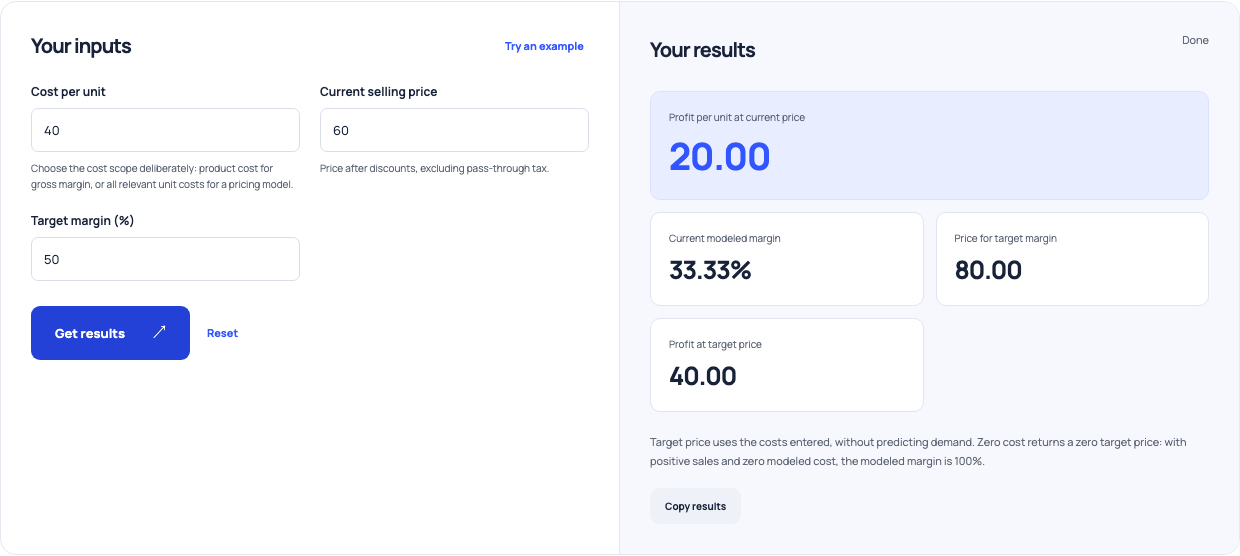
Use this example Opens Profit margin and target-price with these inputs.
A discount changes the remaining amount faster
Reduce the price from 60 to 54 while cost stays at 40. Revenue per unit falls 10%, but the amount left falls from 20 to 14, a 30% reduction. Preserving the original contribution needs about 42.86% more units under these assumptions. For 100 original units, the smallest whole-unit recovery target is 143. This is an arithmetic requirement, not evidence that customers will buy the extra units.
Keep changing fees outside a fixed-cost shortcut
A payment fee calculated as a percentage of price changes when price changes. Treating it as an unchanged unit cost can distort the target price or promotion result. Calculate those fees for each scenario, or use the contribution margin tool with the appropriate percentage and fixed fee inputs. Keep pass-through taxes separate from retained revenue. If you change the included costs between scenarios, describe that change rather than comparing percentages as though the models match.
Look beyond a single product
For a bundle, add the actual components and costs before assessing its combined selling price. A profitable item can support an expensive included item, while extra packing or delivery can consume the apparent saving. Compare the bundle with the alternative purchase you expect customers to make. A larger order value does not by itself prove higher contribution, and a percentage improvement does not establish whether stock or fulfillment capacity can support the offer.
Turn the calculation into a price review
Keep a short scenario record containing cost scope, normal price, proposed price, unit contribution and the volume needed to preserve the baseline. Compare that volume with your own past sales and capacity. Check whether the price still supports fixed overhead after variable costs. The calculator can make these assumptions consistent, but demand, competitor positioning and customer willingness to pay remain separate questions. Review the record when costs or the promotion design change. Assign someone to verify the actual promotion result against that baseline.