How to calculate a free shipping threshold using contribution margin
Calculate an economic floor for free shipping, check mixed baskets and discounts, and measure the result beyond average order value.
Define what the threshold must pay for
A free-shipping threshold is an order-value rule for customers, but its financial purpose needs a separate definition. Choose the merchandise contribution rate available before the shipping and fixed fulfillment costs entered, then choose the amount you want left afterward. Keep pass-through tax out of retained merchandise revenue. Do not subtract the same shipping expense inside the margin and again as a separate cost. The calculator provides an economic floor under these assumptions. The best customer offer still depends on basket composition, delivery destinations and observed purchasing behavior.
Calculate an 80 threshold from a concrete basket
Suppose merchandise contributes 35% of revenue before shipping and the fixed fulfillment charge. Shipping costs 7, fulfillment costs 3, and you want 18 remaining per order. Enter those values with an average basket of 60 in the free shipping threshold calculator. The threshold is 80 because (7 + 3 + 18) ÷ 0.35 equals 80. At that basket value, merchandise contributes 28 and shipping plus fulfillment consume 10, leaving 18. The gap from the current average basket is 20. That gap describes arithmetic, not a forecast of customer spending.
| Basket | Contribution at 35% | After shipping 7 + fulfillment 3 |
|---|---|---|
| 60 | 21 | 11 |
| 80 | 28 | 18 |
| 100 | 35 | 25 |
Rate and fixed costs stay constant here. Basket mix, discounts and destinations may change them.
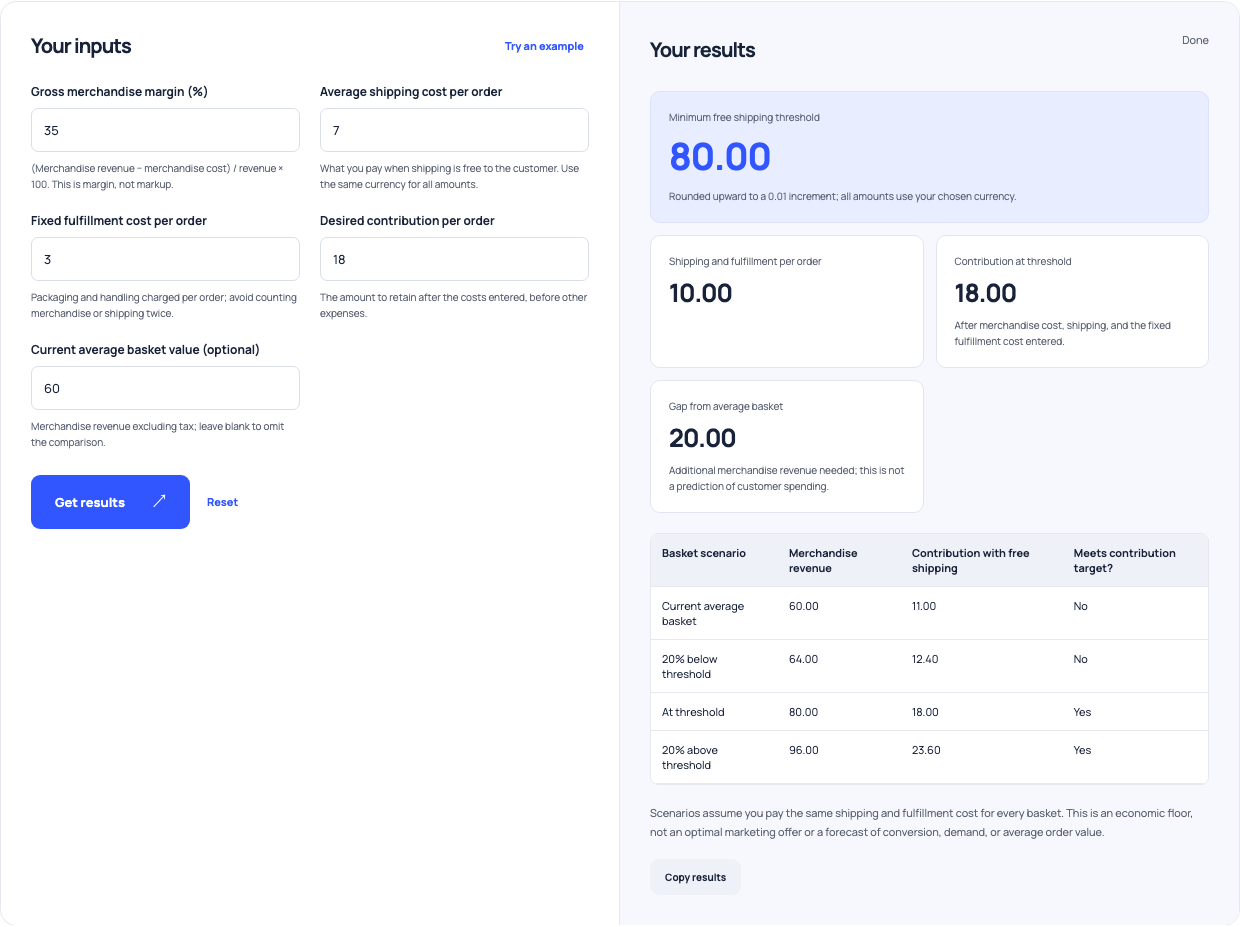
Use this example Opens Free shipping threshold with these inputs.
Test the items customers might add
An order reaching 80 does not necessarily retain the assumed 35% contribution rate. If a customer adds a low-margin item, the combined basket can have a lower rate. At 25%, the same cost and remaining-contribution target require 112 of merchandise revenue. Conversely, a high-margin addition may improve the basket economics. Use the contribution margin calculator to review representative products, then build realistic baskets from order data. Look at the products just below the proposed threshold, because those are the baskets most likely to change if customers attempt to qualify.
Apply discounts before checking the economics
A basket labeled 80 before a discount may retain less than 80 in revenue afterward. For example, a 10% discount reduces an 80 basket to 72. Under the simplified 35% rate, 72 produces 25.20 before the entered shipping and fulfillment, leaving 15.20 rather than 18. Actual contribution can be lower if product costs stay fixed while revenue falls. State whether the customer-facing qualification rule uses a before-discount or after-discount amount, and calculate retained revenue separately. Check the platform settings and the displayed checkout result instead of assuming those definitions match.
Separate destinations and shipping cost jumps
A single shipping cost can hide expensive orders. Review nearby and remote destinations, bulky products and baskets that cross a carrier weight or package-size boundary. An extra item might increase shipping from 7 to 12, changing the threshold to about 94.29 at the same margin and desired contribution. That result is rounded upward to a minor-unit amount. You may need different offers for different delivery zones or products. Platform shipping profiles and rate rules affect implementation, so test actual checkout combinations after configuring a rule rather than relying only on a spreadsheet scenario.
Use AOV as a description of observed orders
The average order value calculator divides consistently defined order revenue by order count. It does not establish profit or explain why customers purchased. Suppose the average increases from 60 to 80 after the offer, while completed orders fall from 100 to 70. Revenue falls from 6,000 to 5,600 despite the higher AOV. If more customers now qualify for subsidized shipping, contribution needs a further review. Compare order count, retained revenue, fulfillment costs and contribution over comparable periods. A bigger average basket is one observation in that review, not the conclusion.
Keep acquisition costs in a separate check
The 18 left after shipping is still available for expenses that were not included in the model. If you need paid advertising to acquire the order, that spending reduces the remaining amount. Use the break-even ROAS calculator with the basket revenue and relevant per-order costs to estimate an advertising ceiling. Fixed overhead also needs funding. Avoid labeling the threshold output net profit unless every relevant expense has actually been included and the accounting basis is appropriate. Naming the result accurately makes it easier to compare the offer with your regular shipping policy.
Build a repeatable shipping-offer review
Save the margin definition, cost inputs, chosen threshold and representative baskets before launch. Verify the checkout rule using a qualifying cart, a cart just below it and a discounted cart in each relevant shipping zone. After launch, compare observed shipping subsidies and contribution with the original assumptions. Check whether customers add useful products, abandon orders or shift purchases from later periods. Adjust the cost model when actual package mix changes. The calculation helps you identify a financially supportable offer to test; evidence from completed orders tells you whether that offer achieves the intended outcome.