Calculate a Freelance Hourly Rate from Billable Hours
Calculate a rate floor from realistic capacity, then separate annual billing from cash collection.
Count the work clients do not buy directly
A freelancer’s calendar includes proposals, administration, learning, bookkeeping and gaps between projects. Those hours can be necessary without appearing on a client invoice. Start with total working time, then estimate the share that will be paid client work. Track that share from your own recent projects where possible. Calling every available hour billable makes the annual plan look easier to reach than a schedule containing the ordinary work of running a business.
Translate the calendar into paid capacity
Forty working hours a week for 46 weeks gives 1,840 hours. At 60% billable utilization, paid capacity is 1,104 hours. The missing 736 hours have not disappeared; they are time the pricing plan must still support. The rate calculator accepts working weeks, weekly hours and utilization separately so you can change one assumption at a time. Working days per week changes daily planning figures, not the annual pool of billable hours.
Build a cost-based floor with a worked example
Enter an annual take-home income goal of 50,000, business expenses of 10,000, 46 working weeks, 40 hours per week, 60% utilization, zero reserve and five working days. Required annual billing is 60,000. Dividing by 1,104 billable hours gives about 54.35 per hour. This figure is a planning floor under the entered assumptions, not a market benchmark or evidence that clients will pay that price for a particular service.
Understand how the optional reserve works
The reserve field is an entered budgeting assumption on profit after business expenses. For example, a take-home goal of 60,000 with a 25% reserve requires 80,000 before that reserve. Add 12,000 of expenses and annual billing becomes 92,000. This gross-up differs from adding 25% to the take-home goal. It is also not a jurisdiction-specific tax calculation: progressive rates, deductions, sales tax and personal circumstances require a separate assessment.
Stress-test utilization before raising the income goal
Keep the 60,000 billing target from the first example and reduce utilization to 40%. Billable capacity becomes 736 hours and the floor rises to about 81.52 per hour. The same desired income now depends on selling fewer hours at a higher price. Compare that scenario with your actual pipeline, project lengths and sales process. A conservative utilization assumption may reveal a capacity or positioning problem that changing the income goal alone would hide.
| Assumption | 60% billable | 40% billable |
|---|---|---|
| Working hours: 46 × 40 | 1,840 | 1,840 |
| Billable hours | 1,104 | 736 |
| Required annual billing | 60,000 | 60,000 |
| Hourly floor (rounded) | 54.35 | 81.52 |
Zero reserve in both scenarios. This is a planning floor, not a market rate.
Connect project billing with collection timing
An annual billing plan does not tell you when customers pay. For a 10,000 project with a 30% deposit, the milestone calculator leaves 7,000 to allocate. Shares of 40%, 40% and 20% of that remaining balance produce payments of 2,800, 2,800 and 1,400 after the 3,000 deposit. Confirm what triggers each milestone and the payment timing separately. A calculated schedule is neither a signed agreement nor confirmation that the money will arrive on time.
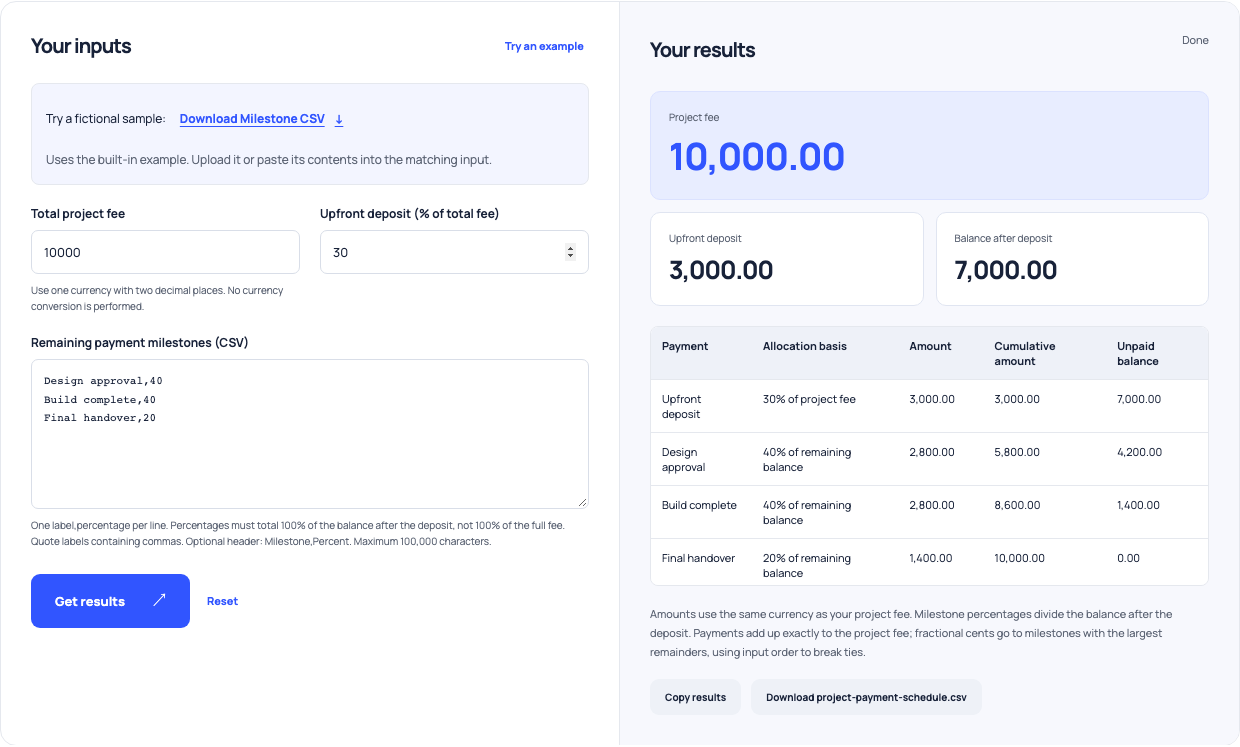
Use this example Opens Project payments with these inputs.
Review the model against completed work
At a regular planning review, compare sold hours, collected revenue and expenses with the assumptions you used. Separate time overruns from unpaid invoices and from a pipeline gap; each can call for a different response. For fixed-price projects, estimate the effective rate using actual delivery hours while keeping administration visible. Update the model when your service or workload changes. A useful rate floor is an ongoing decision aid, rather than a one-time number to apply to every client.