Loan Payments, Extra Principal and Refinance Break-Even
Compare payment schedules and remaining balances without mistaking cash-flow savings for lower total cost.
Record the contract assumptions
The fixed-rate tools use a nominal annual interest rate divided by twelve, month-end payments and cent-rounded interest. They exclude fees, taxes, insurance, daily accrual and variable rates unless a separate upfront refinance cost is entered. Read the actual contract and distinguish the note interest rate from an APR that includes other costs. The model is a reproducible schedule, not a lender quote.
Build a simple principal-only schedule
Enter principal 1,200, annual rate zero and remaining term one year in the fixed-rate calculator. The monthly payment is 100, total interest is zero and the balance clears after 12 months. In the extra-payment tool, add 100 each month. The payment becomes 200 and the balance clears in six months, still with zero interest. Extra payments at positive rates can reduce interest, but only if allowed and applied as modeled.
Compare a longer replacement term
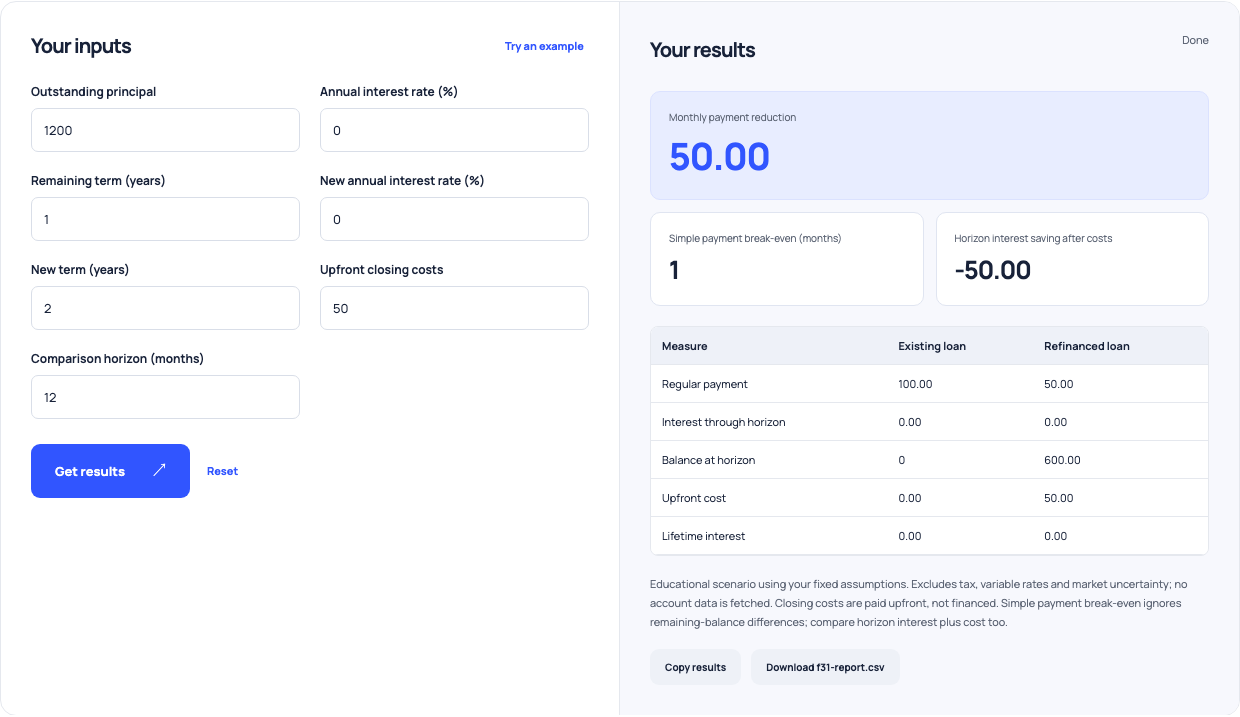
For the refinance example, keep principal 1,200 and both rates at zero. Existing term is one year; new term is two years; closing costs are 50, paid upfront; comparison horizon is 12 months. Existing payment is 100 and replacement payment is 50. Simple payment break-even reports one month because 50 of monthly reduction equals 50 of upfront cost. That is a cash-flow shortcut, not the total economic result.
| Scenario | Monthly payment | Payoff or horizon balance | Interest/cost |
|---|---|---|---|
| Original zero-rate 12-month loan | 100 | Paid off after 12 months | Zero interest |
| Add 100 extra principal monthly | 200 | Paid off after six months | Zero interest |
| Replacement zero-rate 24-month loan | 50 | 600 still owed after 12 months | 50 upfront cost |
| Simple payment break-even | 50 monthly reduction | One month | Ignores the balance difference |
Fictional educational examples; actual terms, accrual and penalties can differ.
Use this example Opens Refinance break-even with these inputs.
Read the balance beside the payment
At the 12-month horizon, the original loan has zero balance while the replacement still has 600. Both have zero modeled interest, so horizon interest saving after the 50 cost is −50. The reduced payment comes from slower principal repayment, not cheaper borrowing. At positive rates, inspect interest through the horizon and remaining balances as well as lifetime interest. A longer term can obscure cost when only the installment is compared.
Check the actual payoff and refinance terms
Confirm prepayment penalties, how extra funds are applied, and whether closing costs are paid upfront or financed. This refinance tool treats them as upfront cash, so financed costs require a different principal scenario. Compare lender accrual and final-payment rules with the modeled schedule. Use the result to identify questions to ask about an offer, not as a professional recommendation that a refinance should proceed.